Inventory for kitchens, schools, offices and shops

Inventory that buzzes before you run out.

Shelfbuzzer tells you what to order and the time you have to order it by. Anyone can log what they take by scanning the shelf with a phone camera, without an account.

No card needed · Set up in an afternoon · Works on any phone

shelfbuzzer.com
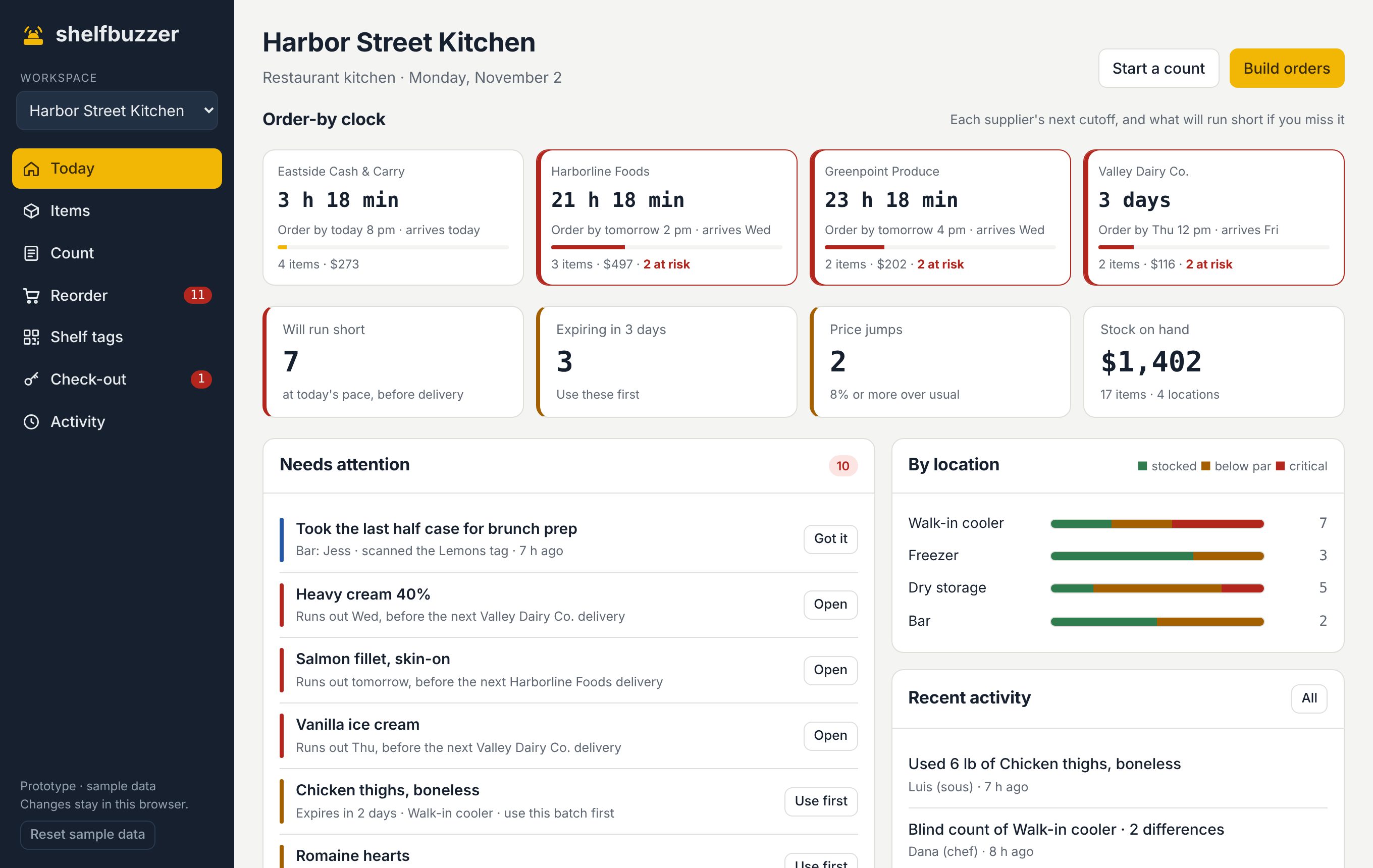
Shelfbuzzer Today page for a restaurant kitchen: order-by countdowns, items that will run short, expiring batches and price jumps
Walk-in coolersCustodial closetsBoiler roomsSupply roomsStockroomsGrounds shedsBars

Clipboards don't buzz.

"Who took the last one?"

Stuff leaves the shelf all day and nobody writes it down, so the count is wrong by Friday.

"We missed the order."

You only find out something is low after the supplier's cutoff has passed.

"Since when does it cost that?"

Prices creep up one delivery at a time, and nobody is comparing.

What's different

Five things your clipboard can't do.

Order-by countdown

Know when to order, not just what's low.

Every supplier has a cutoff and delivery days. Shelfbuzzer counts down to each one and turns red when something will run out before the next truck if you miss it.

  • Cutoff times and delivery days per supplier
  • Days left for every item, from how fast you use it
  • A heads-up while there's still time to order
Order-by countdown cards for four suppliers, three marked at risk

Shelf tags, no login

Anyone can log what they take. No app, no password.

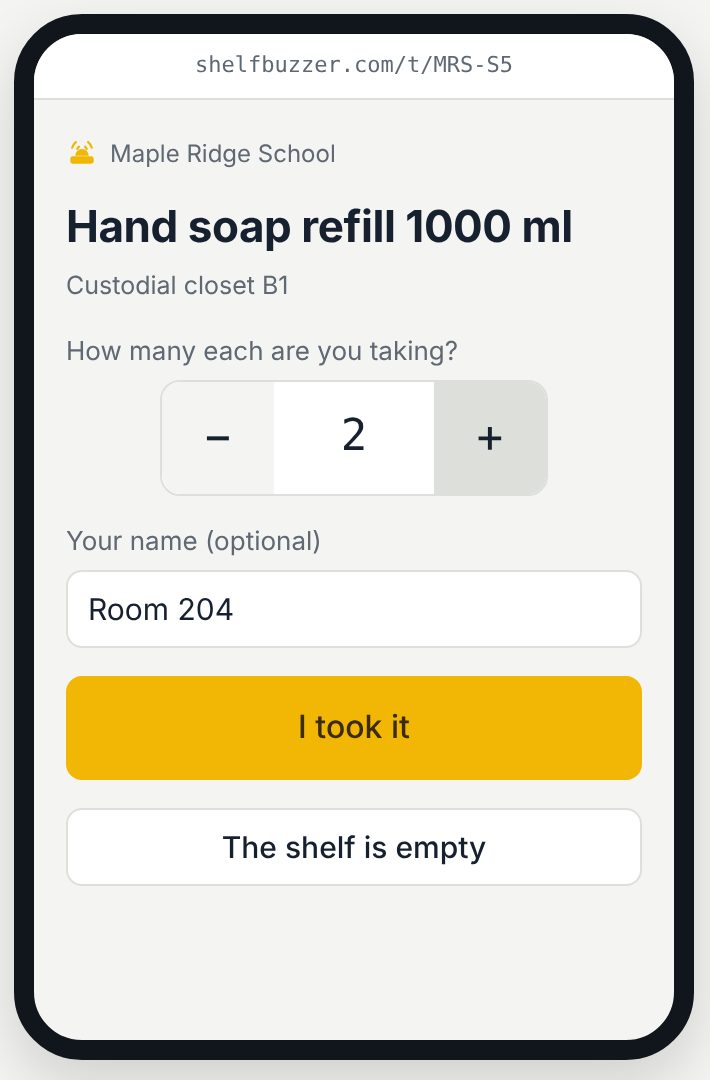
Print a tag for each shelf spot. A teacher, server or part-timer scans it with their phone camera, taps how many they took, and the count updates. If the shelf is empty, one tap tells the team.

  • Works with any phone camera
  • Guests never see prices or other items
  • Free and unlimited on every plan
Phone screen after scanning a shelf tag, asking how many hand soap refills were taken

Borrow before you buy

Use the extra in the other closet first.

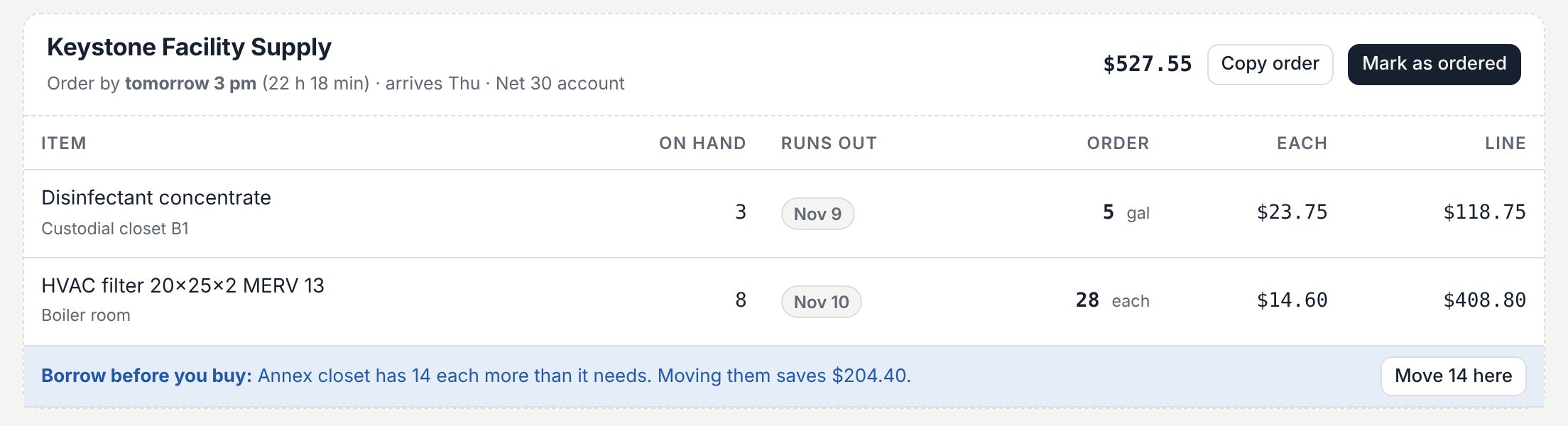
When one place runs low and another has more than it needs, Shelfbuzzer suggests moving it before you order, and shows exactly what that saves.

  • Spots matching items across storage areas
  • One tap to move stock
  • Savings shown on the order
Reorder list suggesting moving 14 spare filters from the annex closet to save $204.40

Price watch

Catch the price creep on every delivery.

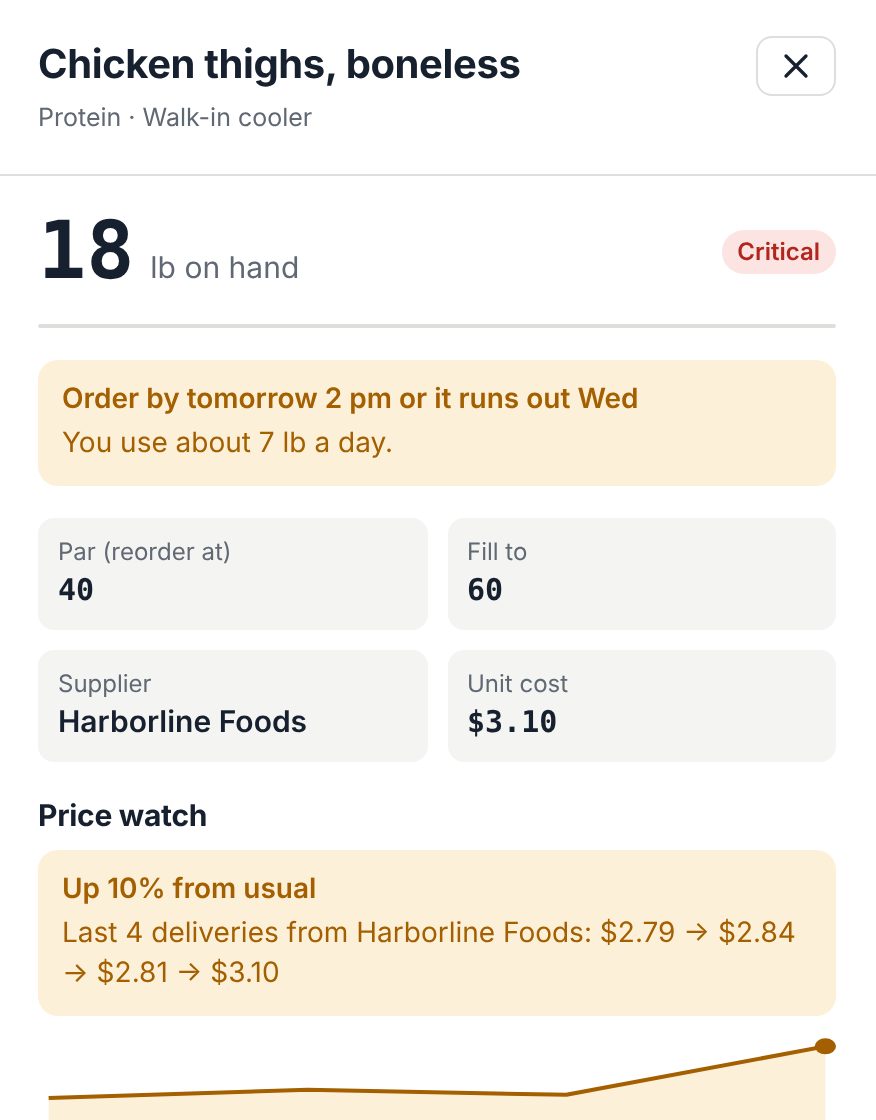
Enter what you paid when a delivery comes in. If a supplier charged noticeably more than usual, you hear about it right away, with the price history to show them.

  • Flags jumps of 8% or more
  • Price history for every item
  • Shows on your Today page
Item details showing chicken thighs up 10% from usual with a price chart

Blind counts

Honest counts, and missing stock in dollars.

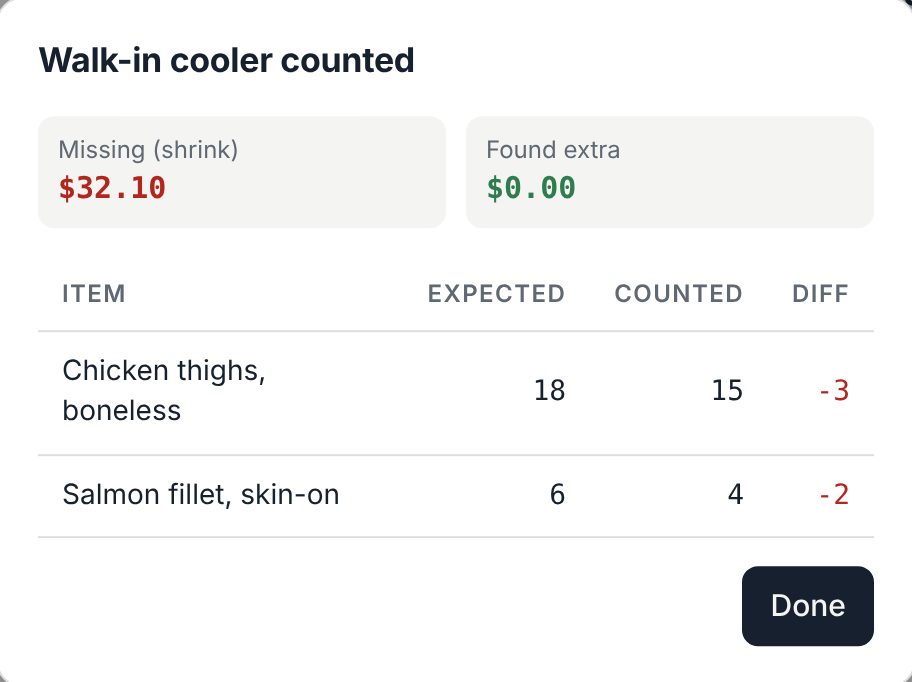
The person counting doesn't see what the system expects, so they count what's really on the shelf. When they finish, you see every difference and what it cost.

  • Built for a phone in one hand
  • Shrink and overage in dollars
  • Every count saved to the activity log
Count results showing $32.10 of missing stock across two items

And the everyday basics

Everything else you'd expect, done simply.

Seasonal par

Ice melt in winter, the fall menu, holiday shipping boxes. Reorder levels switch by themselves with the calendar.

Expiry batches

Track use-by dates per delivery. The oldest batch is used first, and you see what expires in the next 3 days.

Equipment check-out

Ladders, floor machines, chafing dishes, loaner laptops: who has it, when it's due back, and what's overdue.

Reorder lists by supplier

Everything below par, filled back up and grouped by supplier, ready to copy into an email or send from the app.

Every change on record

Uses, deliveries, counts, tag scans and check-outs, each with who did it and when.

Works on any device

Phones in the walk-in, tablets on a cart, computers in the office. Nothing to install.

Who it's for

One app for every shelf that runs out.

Restaurant kitchens

Walk-ins, freezers, dry storage and the bar. Use-by dates, price creep from distributors, and order cutoffs that don't wait.

Chicken thighs · heavy cream · fryer oil

Schools and education

Custodial closets, boiler rooms and grounds sheds across buildings. Staff scan a tag instead of asking the custodian.

Paper towels · HVAC filters · ice melt

Offices and shops

Supply rooms, stockrooms and the front counter. Know when the toner and the boxes are about to run out.

Shipping boxes · toner · coffee

Facilities and trades

Parts, consumables and tools in shops, vans and storerooms, with tools checked out to people by name.

Filters · fasteners · loaner tools

How it works

Running in an afternoon.

  1. 1

    Add your shelves

    Start from a ready-made list for your kind of business and adjust it, or paste your own. Set par levels and your suppliers' delivery days.

  2. 2

    Stick up the tags

    Print shelf tags on any printer or label maker and stick them where things are kept. Your team can start scanning right away.

  3. 3

    Let it buzz

    Shelfbuzzer watches levels, cutoffs, use-by dates and prices, and tells you only when something needs you.

Pricing

Simple prices, per workspace.

Start free for 3 months on any plan. No card needed.

Starter

One kitchen, closet or stockroom.

$7.50/ month, billed yearly
  • 1 site
  • Up to 300 items
  • 3 team members
  • Order-by countdown
  • Shelf tags with no-login scans
  • Blind counts with shrink in dollars
  • Expiry batches, oldest first
  • Reorder lists by supplier
Start free

Business

Several buildings, kitchens or stores.

$49/ month, billed yearly
  • Up to 5 sites
  • Unlimited items
  • 30 team members
  • Everything in Team
  • Move stock between sites
  • Reports across all sites
  • Approvals for big orders
  • Spreadsheet import and export
Start free

District

School districts, chains and campuses.

Custom
  • 6 sites or more
  • Unlimited items
  • Unlimited team members
  • Everything in Business
  • Central storeroom and transfers
  • Help setting up every site
  • Invoice billing
Talk to us

Prices are per workspace, not per person. Every plan is free for 3 months, no card needed. Shelf-tag scans by guests are free and unlimited on every plan.

Questions

Frequently asked.

Do the people who scan shelf tags need an account?

No. Anyone with a phone camera can scan a tag and record what they took or report an empty shelf. They only see that one item's name, never prices or the rest of your inventory. Guest scans are free and unlimited.

How does Shelfbuzzer know when something will run out?

It learns how fast you use each item from your uses, counts and tag scans, then compares the days left with each supplier's next delivery. If an item will run out before the delivery after this one, it warns you before the order cutoff.

What's the difference between par and fill-to?

Par is the level that triggers a reorder. Fill-to is the level you order back up to. For example, par 12 and fill-to 20 means that at 9 on the shelf, Shelfbuzzer suggests ordering 11.

Can I bring my list from a spreadsheet?

Yes. Start from a ready-made list for your kind of business, or paste in your own items. Spreadsheet import and export are included on the Business plan and up.

Is it priced per person?

No. Each plan is a flat price for your workspace, with a set number of team members. Guests scanning shelf tags never count toward that number.

What happens after the 3 free months?

Pick a plan to keep going. If you don't, your workspace becomes read-only: nothing is deleted, and you can still see and export everything.

Is my data private?

Each workspace is sealed off from every other one in the database itself, and every connection is encrypted. Only the people you invite can see your inventory.
Stop running out. Start buzzing.

Try the live demo with sample data from a kitchen, a school and a shop. No sign-up needed.